Level 7: Absorbing the Resource Manifest
Author: Gijs ReijnThe resource manifest is the backbone of how DSC interacts with resources. That’s why understanding and absorbing the resource manifest in your brain, helps you understand the other schematics more effortlessly. Hence, this chapter is dedicated to dive deeper into the resource manifest on a step-by-step basis.
Brace yourself young initiate. You are going to absorb the resource manifest like a sponge does with all the water. You will go through the following topics:
- The schema URI
- List of different capabilities
- Different
kinds
The Schema URI
When you inspect the schema of the resource manifest using the dsc schema --type resource-manifest command, the first property you encounter is $schema. The $schema property specifies the URI version of the resource manifest. It uses an enumeration (enum) to define a fixed set of values.
Note
Don’t mistake the URI version for the version property. These are two different properties.
In this case, the enumeration includes two versions of URLs. One of these URLs uses Microsoft’s aka.ms URL shortener, which simplifies the URL for easier recall. However, the short URL ultimately redirects to the actual schema location.
Taking by example, the following URL: https://aka.ms/dsc/schemas/v3/bundled/resource/manifest.json redirects to the actual schema file hosted at: https://raw.githubusercontent.com/PowerShell/DSC/main/schemas/v3/bundled/resource/manifest.json.
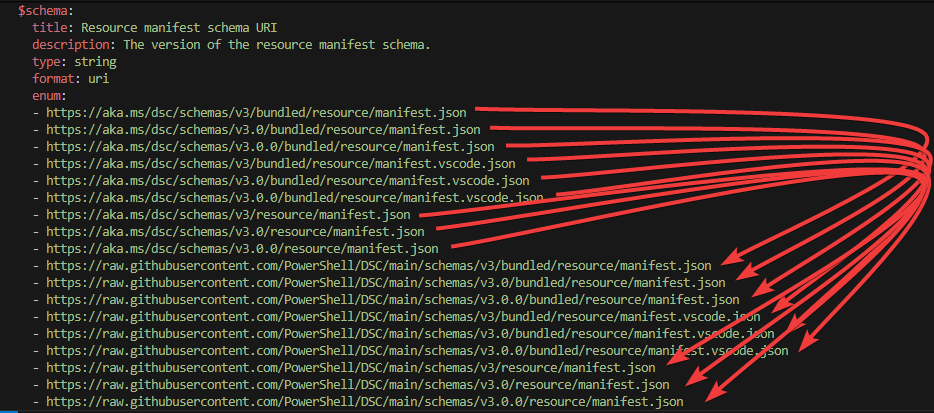
Figure 1: The resource manifest schema URIs
Looking closely towards the URIs, there are three different types of the resource manifest used in the process. The versions include:
- The
bundledversion. - The
manifest.vscode.jsonversion, which is less obvious. - The
resourceversion.
To put it in simple context: the resource version included references towards the definitions, which aren’t directly included into the file. If you open the first resource URI in your favorite browser, you’ll notice the document being relatively small. However, you can see these references ($ref) elements present:
{
  "$schema": "https://json-schema.org/draft/2020-12/schema",
  "$id": "https://raw.githubusercontent.com/PowerShell/DSC/main/schemas/v3/resource/manifest.json",
  "title": "Command-based DSC Resource Manifest",
  "description": "Defines the information DSC and integrating require to process and call a command-based DSC Resource.",
  "type": "object",
  "required": [
    "$schema",
    "type",
    "version"
  ],
  "properties": {
    "$schema": {
      "title": "Manifest Schema",
      "description": "This property must be the canonical URL of the Command-based DSC Resource Manifest schema that the manifest is implemented for.",
      "type": "string",
      "format": "uri",
      "enum": [
        "https://raw.githubusercontent.com/PowerShell/DSC/main/schemas/v3/resource/manifest.json",
        // Limited
      ]
    },
    "type": {
      "$ref": "/PowerShell/DSC/main/schemas/v3/definitions/resourceType.json" // <-- Reference towards other document
    },
  }
  // Limited
}
In the above snippet, you see a reference being made towards another document pointing towards a partial GitHub URL. If you want to get the details of this document, you can add the https://raw.githubusercontent.com/ part and browse to https://raw.githubusercontent.com/PowerShell/DSC/main/schemas/v3/definitions/resourceType.json, which returns:
{
  "$schema": "https://json-schema.org/draft/2020-12/schema",
  "$id": "https://raw.githubusercontent.com/PowerShell/DSC/main/schemas/v3/definitions/resourceType.json",
  "title": "DSC Resource fully qualified type name",
  "description": "The namespaced name of the DSC Resource, using the syntax:\n\nowner[.group][.area]/name\n\nFor example:\n\n  - Microsoft.SqlServer/Database\n  - Microsoft.SqlServer.Database/User\n",
  "type": "string",
  "pattern": "^\\w+(\\.\\w+){0,2}\\/\\w+$"
}
Compared to the bundled version, it will included both reference and definitions directly into the document, making it much bigger.
The manifest.vscode.json versions differ slightly as they are specifically designed for use with Visual Studio Code. These schemas are larger than the bundled versions and enable enhanced authoring capabilities within the editor. By using these schemas, you can access detailed descriptions and guidance while creating resource manifests. This helps you in easy authoring a resource manifest. You will learn more on this later.
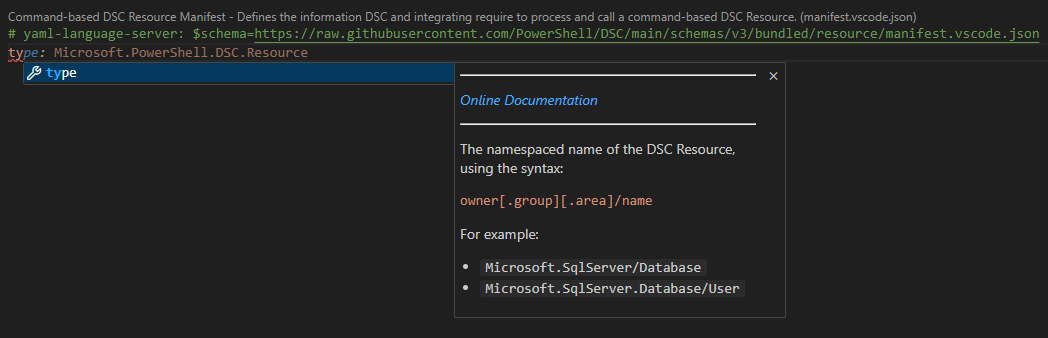
Figure 2: Visual Studio Code enhanced authoring
Schemas evolve over time. New versions may be introduced that differ from the version used in your CLI. Whenever your authoring a resource manifest, always use the latest schema version available. For a full list of schemas, you can go to: https://github.com/PowerShell/DSC/tree/main/schemas
List of Different Capabilities
The list of DSC capabilities has grown when version 3 was released in alpha state. If you look at the resource manifest definition, the list contains eight capabilities, where two are used internally by DSC. The six capabilities you can easily call from dsc are:
- Get
- Set
- Test
- Delete
- WhatIf
- Export
Let’s look closely to each of the capabilities
Get
You have already used this capability when you called the DSC resource Microsoft/OSInfo or Microsoft.Windows/Registry. It gets the current state of the DSC resource. Capability is often referred to as method and this is visible in the resource manifest.
GetMethod:
    type: object
    required:
    - executable
    properties:
        executable:
        description: The command to run to get the state of the resource.
        type: string
        args:
        description: The arguments to pass to the command to perform a Get.
        type:
        - array
        - 'null'
        items:
            $ref: '#/definitions/ArgKind'
        input:
        description: How to pass optional input for a Get.
        anyOf:
        - $ref: '#/definitions/InputKind'
        - type: 'null'
You’ve seen the first part of the get capability. The resource manifest reveals more information, such as the executable property, which is mandatory and should be of type string. Looking further at the definition ArgKind, the following properties are available:
ArgKind:
    anyOf:
    - description: The argument is a string.
      type: string
    - description: The argument accepts the JSON input object.
      type: object
      required:
      - jsonInputArg
      properties:
        jsonInputArg:
          description: The argument that accepts the JSON input object.
          type: string
        mandatory:
          description: Indicates if argument is mandatory which will pass an empty string if no JSON input is provided.  Default is false.
          type:
          - boolean
          - 'null'
When defining the args object in your resource manifest, the anyOf keyword allows for two flexible options. You can either provide a straightforward string as the argument or define a more complex object. This object must include the jsonInputArg property, specifying the argument which accepts a JSON input object or string. You can add the mandatory property to indicate if input is required or not.
To understand the concept more and link the schema against a DSC resource, you can take a look at the Microsoft.Windows/Registry resource. The following snippet illustrates the properties in the current resource manifest:
"get": {
    "executable": "registry",
    "args": [
        "config",
        "get",
        {
            "jsonInputArg": "--input",
            "mandatory": true
        }
    ]
}
The last element in the GetMethod is the InputKind:
InputKind:
    oneOf:
    - description: The input is accepted as environmental variables.
      type: string
      enum:
      - env
    - description: The input is accepted as a JSON object via STDIN.
      type: string
      enum:
      - stdin
Most CLIs pass a JSON object through STDIN. STDIN stands for standard input and is commonly used in command-line interfaces representing the input stream which a program reads data from. In this case, DSC sends data to the executable. Alternatively, the input can also be set as environment variable.
Set
The Set capability is used to configure the desired state of a DSC resource. This capability ensures that the resource matches the specified configuration. Like the Get capability, the Set capability is defined in the resource manifest with specific properties nearly similar as the Get capability.
Here is an example schema snippet for the SetMethod:
SetMethod:
    type: object
    required:
    - executable
    properties:
      executable:
        description: The command to run to set the state of the resource.
        type: string
      args:
        description: The arguments to pass to the command to perform a Set.
        type:
        - array
        - 'null'
        items:
          $ref: '#/definitions/ArgKind'
      input:
        description: How to pass required input for a Set.
        anyOf:
        - $ref: '#/definitions/InputKind'
        - type: 'null'
      implementsPretest:
        description: Whether to run the Test method before the Set method.  True means the resource will perform its own test before running the Set method.
        type:
        - boolean
        - 'null'
      handlesExist:
        description: Indicates that the resource directly handles `_exist` as a property.
        type:
        - boolean
        - 'null'
      return:
        description: The type of return value expected from the Set method.
        anyOf:
        - $ref: '#/definitions/ReturnKind'
        - type: 'null'
  ReturnKind:
    oneOf:
    - description: The return JSON is the state of the resource.
      type: string
      enum:
      - state
    - description: The return JSON is the state of the resource and the diff.
      type: string
      enum:
      - stateAndDiff
The executable property is again mandatory here. The args property, similar to the Get capability, allows for flexible argument definitions using the ArgKind schema and the InputKind is also present.
For example, in the Microsoft.Windows/Registry resource, the Set capability is defined as follows:
"set": {
    "executable": "registry",
    "args": [
        "config",
        "set",
        {
            "jsonInputArg": "--input",
            "mandatory": true
        }
    ]
}
In the SetMethod, there are two properties added. The implementsPretest property in the resource manifest indicates whether the resource performs its own validation. In this case, it will call the Test method itself if it has been set to True. In the Microsoft.Windows/Registry it hasn’t been set. However, if it was set to True, you can imagine that the resource itself would require to call the Test method when you want to set a keyPath even it was already present.
The last property handlesExist is newly added to the resource manifest. It helps indicating to dsc if the _exist property can be used in set operations for creating or deleting instances. This concept is more advanced and will be touch upon later.
By defining the Set capability in this way, the resource manifest ensures that the resource can be configured to match the desired state.
Test
The Test capability tests the state of the resource. Imagine you wanna know if the HKLM\CustomPath has been added correctly added. Invoking dsc resource test --resource Microsoft.Windows/Registry --input {"keyPath":"HKLM\\CustomPath"} will check if the property keyPath exists.
The following YAML snippet illustrates the Test capability:
TestMethod:
    type: object
    required:
    - executable
    properties:
      executable:
        description: The command to run to test the state of the resource.
        type: string
      args:
        description: The arguments to pass to the command to perform a Test.
        type:
        - array
        - 'null'
        items:
          $ref: '#/definitions/ArgKind'
      input:
        description: How to pass required input for a Test.
        anyOf:
        - $ref: '#/definitions/InputKind'
        - type: 'null'
      return:
        description: The type of return value expected from the Test method.
        anyOf:
        - $ref: '#/definitions/ReturnKind'
        - type: 'null
There is a slight difference between the elements from the Get capability. The ReturnKind definition returns a value expected from the test method.
{
  "$schema": "https://json-schema.org/draft/2020-12/schema",
  "$id": "https://raw.githubusercontent.com/PowerShell/DSC/main/schemas/v3/definitions/returnKind.json",
  "title": "Return Kind",
  "type": "string",
  "enum": [
    "state",
    "stateAndDiff"
  ],
  "default": "state",
  "$comment": "While the enumeration for return kind is the same for the `set` and `test`\nmethod, the way it changes the behavior of the command isn't. The description\nkeyword isn't included here because the respective schemas for those methods\ndocument the behavior themselves."
}
Again, Microsoft.Windows/Registry DSC resource is a resource to illustrate this. If you had invoked the command earlier to test if the keyPath existed, you would have noticed two properties returned:
inDesiredStatedifferingProperties
Even thought the resource itself hasn’t defined the Test capability in the resource manifest, dsc performs a synthetic test. The synthetic test attempts to look at the properties and adds any if it is different. In the following example, it shows when the path didn’t exist:
desiredState:
  keyPath: HKLM\CustomPath
actualState:
  keyPath: HKLM\CustomPath
  _exist: false
inDesiredState: false
differingProperties:
- _exist
If it did, the differingProperties would have been an empty array []. The returned properties are useful to see what properties aren’t in the state you want them to be.
Delete
The Delete capability has been added in the engine to simplify resource authoring and provide a clear distinction from the Set capability. While Set is responsible for creating or updating a resource to match a desired state, Delete specifically handles the removal of resource instances. This separation makes the logical code flow in the engine less.
Learning about the Delete capability is done later when you will learn about configuration documents.